Loading... # 引言 最近项目中需要设置省市县,看了一下公开的,不是很新,淘宝、京东、拼多多都是级联单个获取,爬虫虽然可以,但是效率不高,高德API虽然有,但是像一些城市,批量处理起来效果并不理想,搞笑的是这个东西居然还有人卖。 # 数据源 ~~[中华人民共和国民政部 ](https://www.mca.gov.cn/n156/n186/index.html)~~ ~~比如说目前最新的数据时2022年的数据~~ ~~https://www.mca.gov.cn/mzsj/xzqh/2022/202201xzqh.html~~ 数据源:https://dmfw.mca.gov.cn/XzqhVersionPublish.html 接口:https://dmfw.mca.gov.cn/xzqh/getList?code=0&trimCode=true&maxLevel=3&_=[时间戳] # 表结构 ```sql CREATE TABLE `t_area` ( `code` varchar(8) CHARACTER SET utf8mb4 COLLATE utf8mb4_0900_ai_ci DEFAULT NULL COMMENT '代码', `sheng` varchar(16) CHARACTER SET utf8mb4 COLLATE utf8mb4_0900_ai_ci DEFAULT NULL COMMENT '省', `shi` varchar(64) CHARACTER SET utf8mb4 COLLATE utf8mb4_0900_ai_ci DEFAULT NULL COMMENT '市', `xian` varchar(64) CHARACTER SET utf8mb4 COLLATE utf8mb4_0900_ai_ci DEFAULT NULL COMMENT '县' ) ENGINE=InnoDB DEFAULT CHARSET=utf8mb4 COLLATE=utf8mb4_0900_ai_ci ``` # 解析和录入[已废弃] 为了避嫌,把页面上的内容复制下来,存到一个txt文件里吧,这绝对是人工操作的。 这里使用了封装的工具类,小伙伴萌可以通过其他方式哦,比如说pymysql直接搞。 ```python from common import dbHelper dbm = dbHelper.MySQL() dbm.execute("""TRUNCATE TABLE t_area""") with open('ssx.txt', 'r', encoding='utf-8') as f: code = "" sheng = "" shi = "" xian = "" for line in f: tmp = line split = tmp.split("\t") code = split[0] if len(split) == 2: if split[1].count("\xa0") == 0: if sheng != split[1]: shi = "" xian = "" sheng = split[1] if split[1].count("\xa0") == 1: if shi != split[1]: xian = "" shi = split[1] if split[1].count("\xa0") == 3: xian = split[1] else: code = "unknown" if split[0].count("\xa0") == 0: if sheng != split[1]: shi = "" xian = "" sheng = split[0] if split[0].count("\xa0") == 1: if shi != split[1]: xian = "" shi = split[0] if split[0].count("\xa0") == 3: xian = split[0] sheng = sheng.strip() shi = shi.strip() xian = xian.strip() print(sheng, shi, xian) dbm.execute("""INSERT INTO t_area(code, sheng, shi, xian) VALUES (%s, %s, %s, %s)""", (code, sheng, shi, xian)) ``` # 解析和录入 因为接口返回的是json,那么直接解析即可,台湾省的code目前是资料暂缺,旧版数据是710开头,手动给补充上。 ``` content = requests.get(f"https://dmfw.mca.gov.cn/xzqh/getList?code=0&trimCode=true&maxLevel=3&_={time_stamp}", headers=headers) print("已接收到请求") a = content.json() print("已转义到json") dbm = dbHelper.MySQL() result = [] def compute(province="*", city="*", district="*", code="*"): # 特殊处理 if province == '台湾省' and city == '*' and district == '*': code = "710" code = code + "0" * (6 - len(code)) if district == '*' and city: district = city city = '*' result.append((province, city if city != '*' else None, district if district != '*' else None, code)) for i in a['data']['children']: province = i['name'] code = i['code'] compute(province=province, code=code) if 'children' in i and i['children']: for j in i['children']: city = j['name'] code = j['code'] compute(province=province, city=city, code=code) if 'children' in j and j['children']: for k in j['children']: district = k['name'] code = k['code'] compute(province=province, city=city, district=district, code=code) if len(result) > 3000: dbm.execute("""TRUNCATE TABLE china_area""") dbm.execute_many("""INSERT INTO china_area(sheng, shi, xian, code) VALUES (%s, %s, %s, %s)""", result) else: raise Exception("数据量过少") ``` # 结语 <div class="tip inlineBlock warning"> 需要注意的是,我只是简单的抽样核对了一些数据,但是不保证数据完全准确,如有问题,可评论联系。使用随意,但是我并不对数据完整性真实性负责哦 </div> 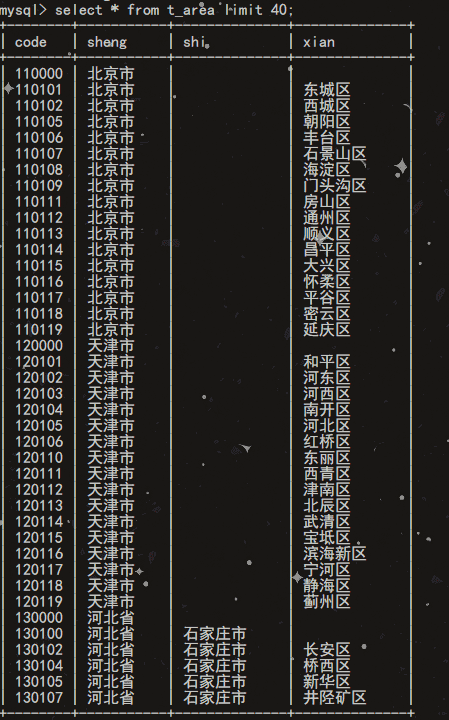 © 允许规范转载 打赏 赞赏作者 支付宝微信 赞 1 如果觉得我的文章对你有用,请随意赞赏